Organization Pages
Last updated: June 5, 2026
Every organization on Halo has a dedicated page — a searchable profile visible to the corporate R&D and innovation teams actively looking for research and technology partners. There are two types, depending on your organization's role on the platform: Institution Pages for universities and academic research organizations, and Company Pages for non-academic organizations like startups, suppliers, and CROs. Both give your organization a presence on Halo that you don't have to build from scratch.
Jump to your page type:
Institution Pages (Universities and Academic Organizations)
Company Pages (Startups, Suppliers, CROs, and Other Non-Academic Organizations)
Institution Pages
An Institution Page gives your university or research organization a dedicated presence on Halo — automatically populated with your faculty's expertise, top research areas, and partnering opportunities, and visible to the corporate R&D and innovation teams actively searching for research partners.
Halo pulls from publication data to surface your institution's research strengths, faculty profiles, and partnering listings automatically.
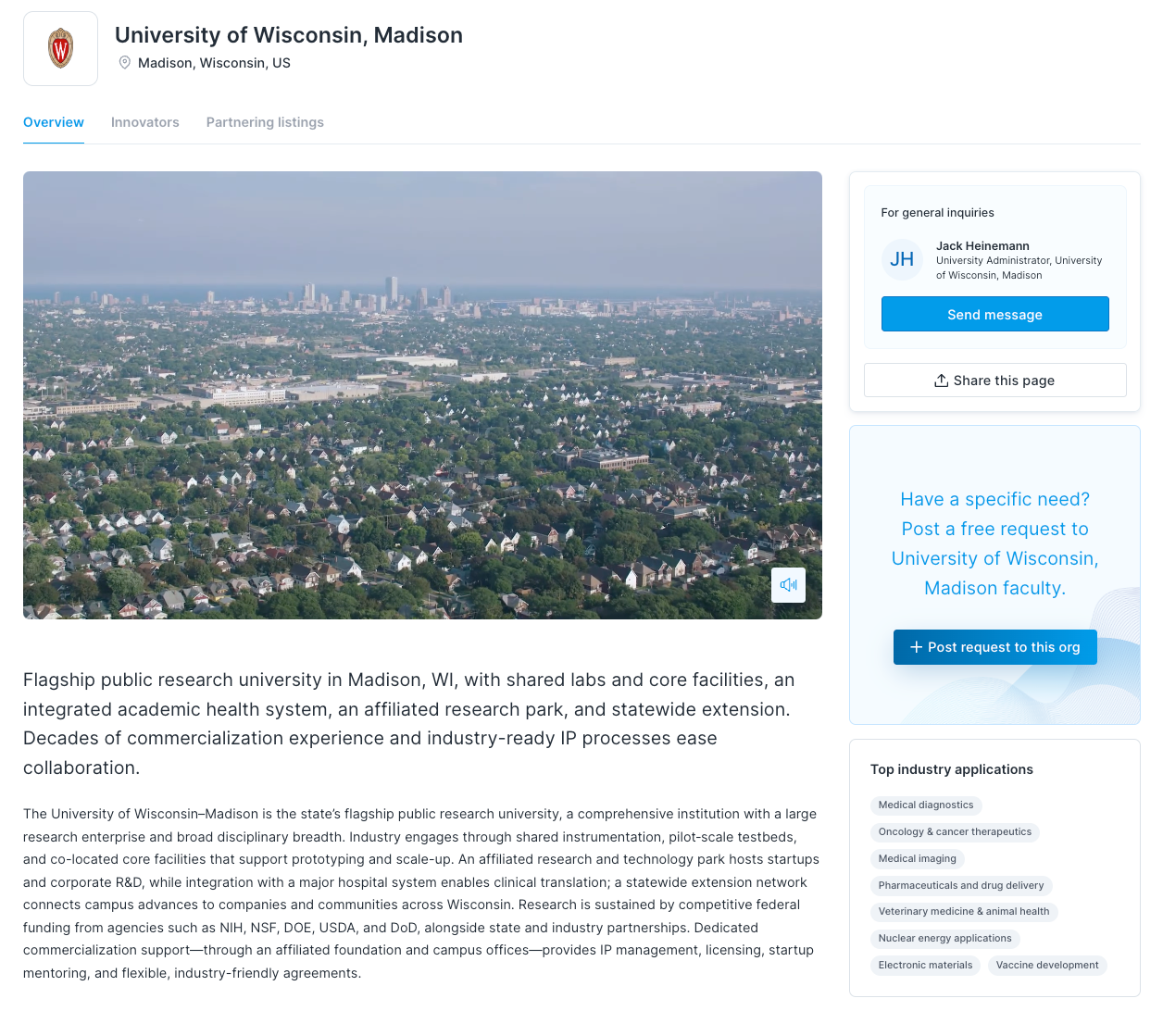
What's on your Institution Page
Institution overview — a summary of your institution and its research focus
Top industry applications — the research areas your faculty publish in most—with the greatest footprint of past industry partnerships—surfaced automatically and updated as faculty join and update their profiles
Faculty list — a browsable directory of your institution's innovators on Halo, filterable by industry application
Partnering listings — a tab showcasing the partnering opportunities your faculty have listed on Halo
Note: AI-defined commercial strengths (top industry applications) are available for organizations on a paid plan.
Paid plans
Paid plans include additional options to enhance your institution's presence on Halo. Depending on your plan, you can unlock features like AI-defined commercial strengths, or a featured organization listing for greater visibility across the platform.
Interested in upgrading your institution's page? Reach out to our team at support@halo.science to learn more about premium options.
How to claim your Institution Page
Institution Pages are set up by the Halo team. To get started, reach out to support@halo.science, and we'll get your page live.
Once your page is active, the content is driven by your faculty's profiles on Halo — so the best way to strengthen your Institution Page is to get your researchers signed up and their profiles complete.
How to strengthen your Institution Page
Your Institution Page gets more valuable as more of your faculty join Halo and actively use the platform. Two things drive the content:
Faculty profiles — each researcher who joins Halo and associates with your institution adds to your faculty list and enriches your institution's research areas. The more complete their profiles, the better Halo can match your institution with relevant industry partners. Top industry applications recalculate automatically as faculty join and update their profiles — no manual updates needed on your end.
Partnering listings — faculty who create partnering listings will have those appear on your Institution Page's listings tab, strengthening your institution's discoverability and signaling active partnering opportunities to industry. Listings are added by individual faculty members from their own profiles. For instructions, see Partnering Listings.
Faculty profiles and your Institution Page
Your Institution Page is only as strong as the faculty profiles behind it. Every researcher on Halo who's associated with your institution contributes to your faculty list, your top industry applications, and your partnering listings tab.
Faculty profiles are created in one of two ways: a researcher signs up for Halo and associates themselves with your institution, or Halo generates a profile automatically from their public publication data. Automatically generated profiles are clearly labeled as unclaimed until the researcher has reviewed and confirmed theirs. Faculty can claim their profile, update their industry applications, and edit their About statement at any time. Changes propagate to your Institution Page within a few minutes.
For a full breakdown of how faculty profiles work, how the AI classification works, and what controls are available to faculty, see Faculty Profiles on Halo.
Who can see your Institution Page
Your Institution Page is visible to anyone on Halo, including the corporate R&D and innovation teams using Halo to find research partners. It's also indexed for search, giving your institution visibility beyond the platform.
Making changes to your Institution Page
Top application areas and faculty categorization therein are driven by individual faculty profiles. To make a change, talk to your faculty member about claiming and updating their profile.
Need to update something on your Institution Page outside of the top application areas? Just email support@halo.science and our team will take care of it for you.
Company Pages (Startups, Suppliers, CROs, and Other Non-Academic Organizations)
A Company Page is a dedicated profile for your organization on Halo, automatically built from your existing presence on the platform and publicly-available information on the web. It's visible to corporate R&D teams actively searching for partners.
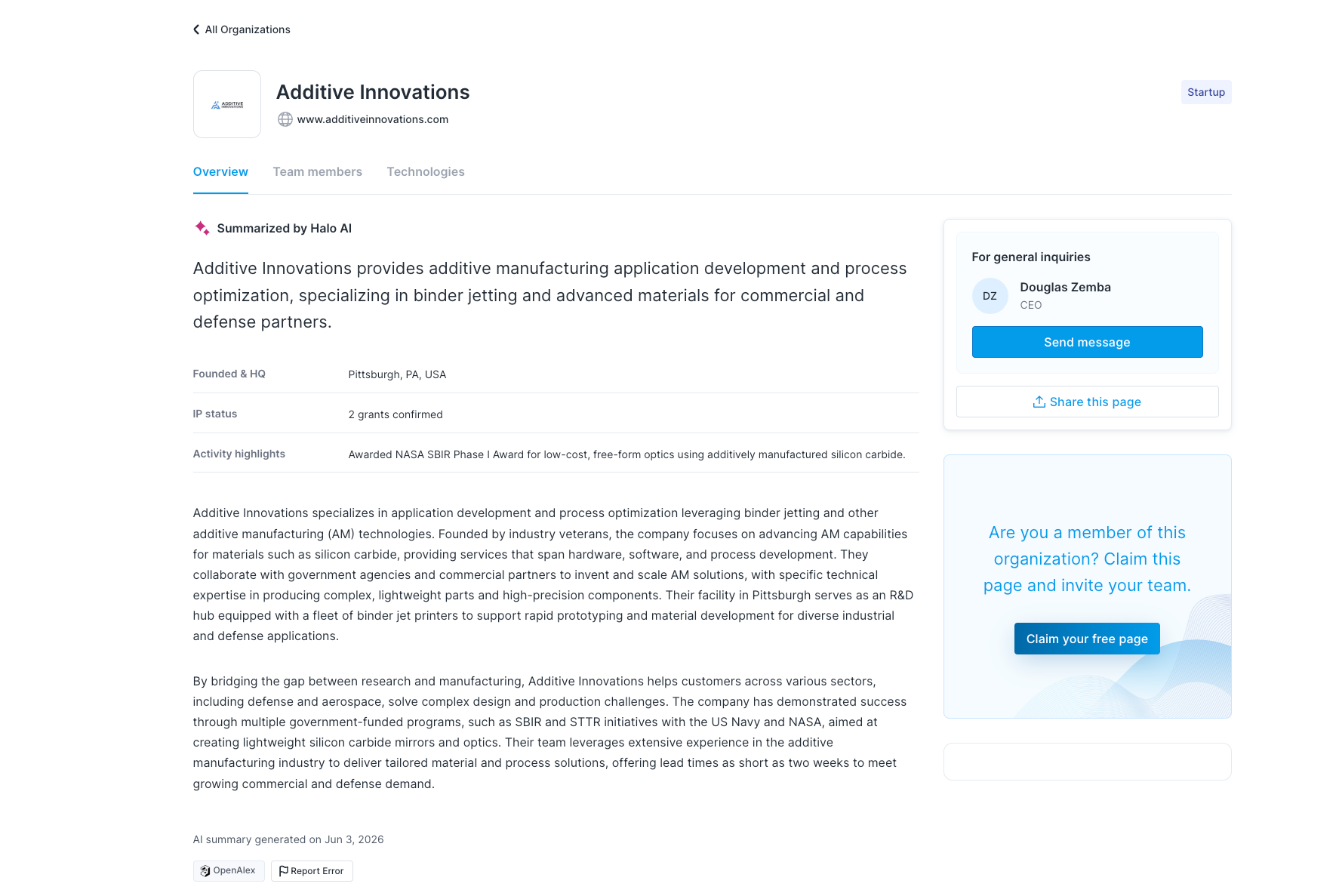
What's on your Company Page
Your Company Page is organized into three tabs:
Overview — your organization summary, top industry applications, key data points, and designated contact information
Team Members — users who have joined Halo and selected your organization as their company when signing up
Services / Technologies — your organization's active partnering listings, split by listing type. These tabs appear dynamically: if your team has only service listings, you'll see a Services tab; if they have technology listings, you'll see a Technologies tab; if they have both, both tabs appear
Who has a Company Page
Every organization active on Halo has a page. If you're already on Halo, we've already generated your page for you. If you aren't yet on Halo, reach out to support@halo.science to request your Company Page.
How to view your Company Page
Log in, click your profile icon in the top right, then click "View company page."
How to strengthen your Company Page
Your page gets stronger as your team builds out their presence on Halo. Two things drive the content:
Team member profiles — each person who joins Halo and associates with your organization contributes to your Team Members tab and enriches your organization's overall presence. The more complete their profiles, the better Halo can match your organization with relevant industry partners.
Partnering listings — listings drive the Services and Technologies tabs, your top industry applications, and your organization's discoverability. Listings are added by individual team members from their own profiles, not from the Company Page itself. For instructions, see Partnering Listings.
How the contact on your page is decided
The first user associated with your organization on Halo is automatically set as the designated contact. To update this, email support@halo.science.
Making changes to your Company Page
Your page content updates automatically as team members add and edit their listings. For anything outside of listings — such as your organization overview — email support@halo.science.
Featured listings
Featured listings are a premium tier that surfaces your organization first in search results, giving you greater visibility with the most commercially active corporate partners. Email support@halo.science to learn more.
Who can see your Company Page
Your Company Page is visible to anyone on Halo, including the corporate R&D and innovation teams using Halo to find partners. It's also indexed for search, giving your organization visibility beyond the platform.
Frequently asked questions
Q: How do I get an organization page on Halo?
For Institution Pages, reach out to support@halo.science and our team will get your page live. For non-academic Company Pages, if you're already active on Halo, your page has been generated automatically. If not, contact support@halo.science to get started.
Q: How often does my page update?
Institution Pages: When a faculty member claims their profile or updates their industry applications, your Institution Page recalculates within about five minutes. No action needed on your end.
Company Pages: Your page reflects your listings. Updates to listings appear on your page shortly after they're saved.
Q: How do I improve my page?
For both page types, two things drive the content: member profiles and partnering listings.
Institution Pages: Encourage your faculty to join Halo, associate with your institution, and keep their profiles complete. Faculty who add partnering listings will also have those surface on your Institution Page's listings tab.
Company Pages: Encourage your team to join Halo, associate with your organization, and keep their profiles complete. Team members add listings from their individual profiles — the more active and complete those listings are, the stronger your page. For instructions, see Partnering Listings.
Q: Can I edit the content on my page directly?
Most page content is generated automatically — from faculty profiles and listings for Institution Pages, and from member profiles and listings for Company Pages. If you notice any errors in anything that can't be updated through those means, email support@halo.science and our team will take care of it.
Q: Why do some faculty members not appear on my Institution Page? (Institution Pages only)
Your faculty list shows researchers who have joined Halo and associated themselves with your institution, as well as researchers Halo has created AI-summarized profiles for based on their publication data. If someone is missing, they may not yet have a profile on Halo. Reach out to support@halo.science and we can look into it.
Q: Can I control which faculty appear on my Institution Page? (Institution Pages only)
Faculty appear on your page based on their association with your institution. You cannot manually add or remove faculty from your Institution Page, but you can contact support@halo.science if something looks incorrect.
Q: What are "top industry applications" and how are they chosen?
Institution Pages: Halo’s AI pipeline combines publication data from OpenAlex with faculty input to assess which industry applications from our controlled taxonomy have the highest concentration of publishing faculty at your institution, and surfaces those with the strongest evidence of industry collaboration.This feature is available on paid plans. For more detail on how the classification works, see Faculty Profiles on Halo.
Company Pages: Industry applications are derived from your active partnering listings and reflect the capability areas where your organization is most active on the platform.
Q: What's the difference between a standard and featured listing?
Featured listings are a premium tier — they surface first in search results, giving your organization maximum visibility with the most commercially active partners. Email support@halo.science to learn more about featured listing options.
Q: Does my page appear in search results outside Halo?
Yes. Both Institution Pages and Company Pages are indexed for search, so your organization can be discovered through Google and AI-powered search tools, not just within Halo.